
Connections with Exact Online, OneDrive, Microsoft 365 and Mollie
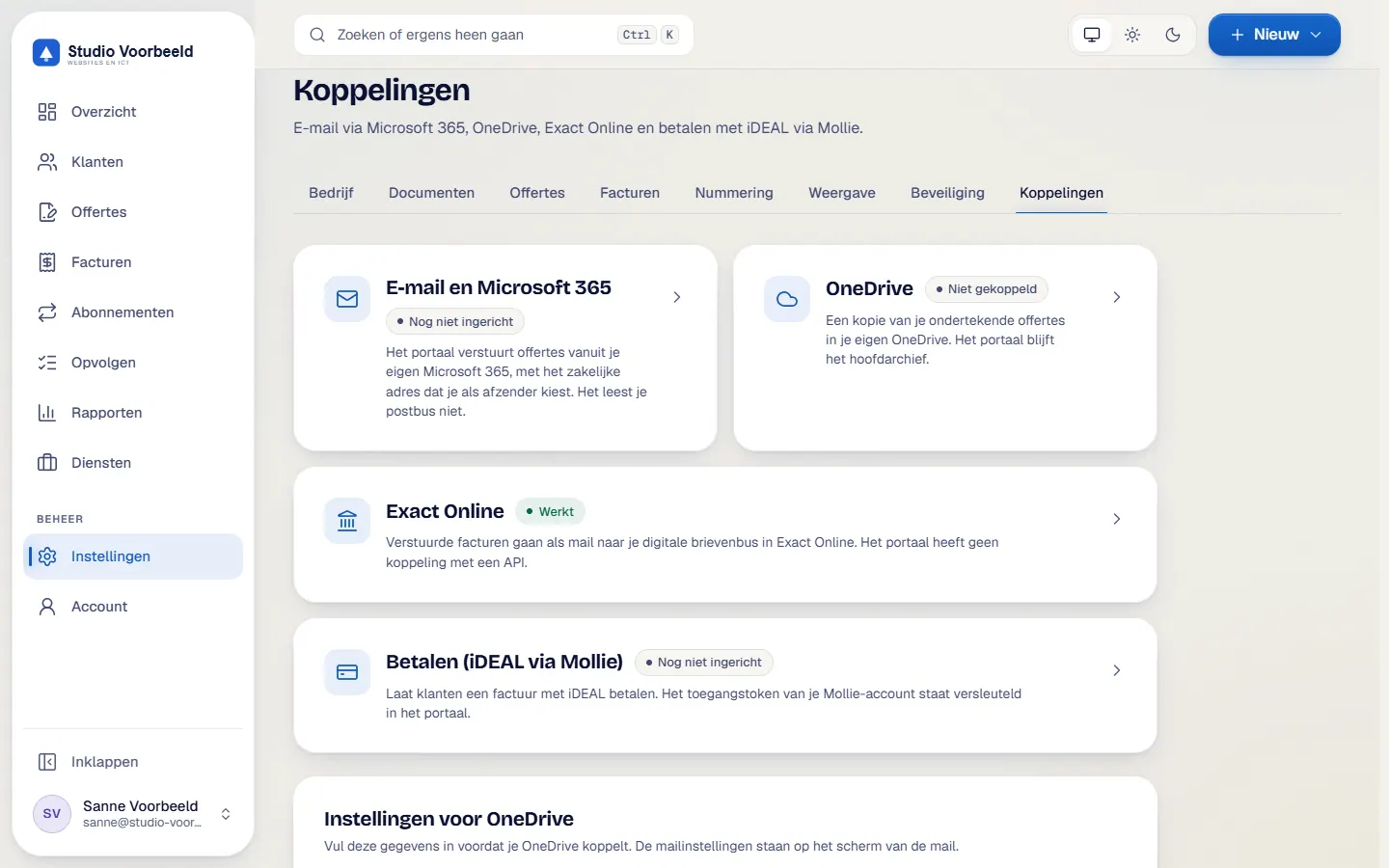
Four connections keep your documents and payments in order: a copy to Exact Online, a copy in OneDrive, email through Microsoft 365 and iDEAL through Mollie. What they do and what they do not do is set out below.
No account or sign-up needed: enter your name and email and you are in your own demo straight away. After 30 minutes everything is wiped.
Who it is for
- You have an accountant or use Exact Online and do not want to book your sales invoices there a second time.
- You keep your files in OneDrive and want the signed quote and the invoices to land there by themselves.
- You want the portal to email from your own Microsoft 365 address.
What it saves you
Less double entry with Exact
The portal emails the invoice as a pdf to the digital mailbox of your Exact Online account. Exact reads it in from there.
One folder per job
In OneDrive the quote, the terms and all invoices of one job go into the same project folder. You set the folder and the file name yourself.
Email from your own address
Clients receive quotes and invoices from your address. The connection may only send from one mailbox and does not read mail.
Paying by iDEAL
With Mollie connected your client sees a button to pay by iDEAL.
How it works, step by step
- Open InstellingenThe connections sit with the settings. You switch them on one at a time.
- Connect Microsoft 365 for emailWithout Microsoft 365 the portal cannot send anything. The connection only has the right to send mail, limited to one mailbox.
- Connect OneDriveThis copies signed quotes, terms and invoices as pdf files. The default folder structure is Clients, year and project.
- Enter the address of the Exact mailboxYou fill in the address of the digital mailbox for sales invoices of your Exact account. A test email with a made-up invoice shows whether it arrives.
- Connect MollieYou connect your own Mollie account. A new connection starts in test mode.
- Choose per invoiceIn 'Controleer en verstuur' you decide for each invoice whether a copy goes to Exact and to OneDrive. If an upload fails, it stays visible with 'Opnieuw proberen'.
The screenshots show Avsaro with sample data from the invented company Studio Voorbeeld. The portal interface is in Dutch; documents, client pages and emails come in Dutch and English.
How the Exact Online connection works
The portal emails one pdf per invoice to the Exact OnlineAccounting software used by many business owners and accountants. Avsaro sends invoices as a pdf to your digital mailbox in Exact.
Read more address for sales invoices, where Exact reads it in. You record payments in Avsaro, which keeps your payment status in one place. If you email the same invoice twice, it can end up twice in Exact. Avsaro warns you about that.
What you set up yourself
Email and OneDriveMicrosoft's online storage. Avsaro keeps a pdf copy of your signed quotes, terms and invoices there.
Read more run through apps in your own Microsoft 365 environment. Assist2go sets that up with you; it needs a one-off setting on the Microsoft side. For Exact you need an account with a mailbox. For Mollie you need your own Mollie account. Attachments stay within about 3 MB per email, otherwise a download link appears on the client page.
Other accounting packages
Do you use Moneybird, SnelStart, Twinfield, Yuki, e-Boekhouden, Jortt, Informer, Visma eAccounting or AFAS? We discuss an integration on request. In the meantime you work with any package through the csv file and the quarterly summary.
Integrations
Works with what you already use
Exact Online (through the digital mailbox), Mollie for iDEAL, Microsoft 365 for email and OneDrive for storage. Other accounting packages we discuss on request. You connect one accounting package at a time.
- Exact Online

- SnelStart
- Yuki (Nmbrs)
- e-Boekhouden.nl


- AFAS

- Microsoft 365
- OneDrive
All brand and product names and logos belong to their respective owners. Mentioning them does not mean the owner endorses or recommends Avsaro. Avsaro is not affiliated with these parties. Microsoft, Microsoft 365 and OneDrive are trademarks of the Microsoft group of companies.
Frequently asked questions
Do I need Microsoft 365?
For email and OneDrive, yes. Without Microsoft 365 the portal cannot send email.
Does the payment status come back from Exact?
No. Avsaro sends a copy of the invoice and you record the payment status in Avsaro.
Does it work with Moneybird or Twinfield?
We discuss an integration on request. In the meantime your accountant works with the csv file and the quarterly summary.
What does Mollie cost?
Mollie charges an amount per transaction, which you pay to Mollie. Current rates are on mollie.com.
Related features
Terms
Read more about this

Next step
Ask about your situation
Do you use another accounting package or a different mail environment? Send a message and we will look at what is possible.
No account or sign-up needed: enter your name and email and you are in your own demo straight away. After 30 minutes everything is wiped.
Get in touch