
Archiving and retention periods
In the portal an invoice never disappears. You archive it with a reason, it drops out of your lists and you restore it with a click. You set retention periods yourself, with a lower limit.
No account or sign-up needed: enter your name and email and you are in your own demo straight away. After 30 minutes everything is wiped.
Who it is for
- You want to tidy your lists without losing anything.
- You want to be able to show that a document is still exactly as it was.
- You want to know how long the data of an agreement is kept.
What it saves you
Tidy lists
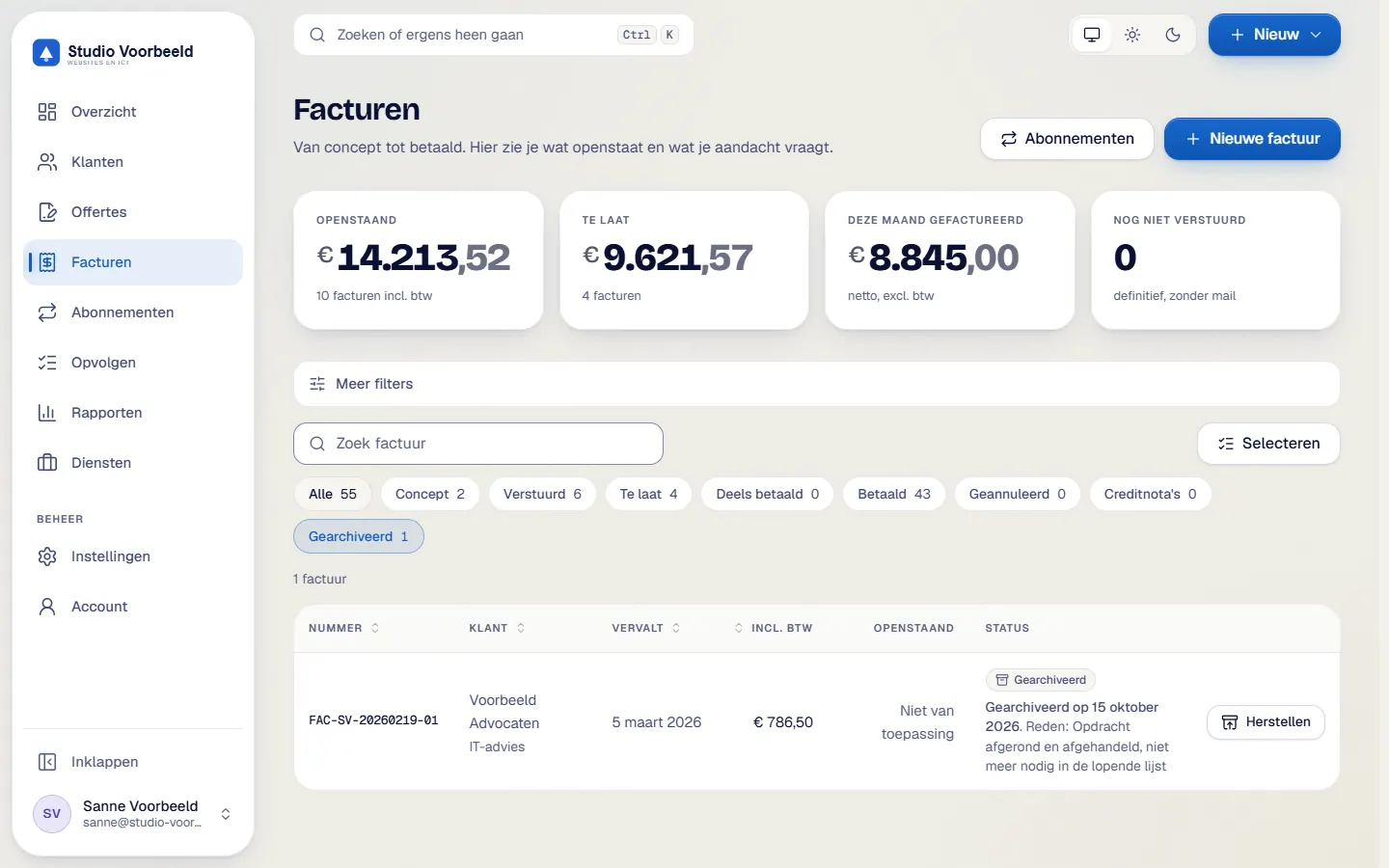
An archived invoice or quote drops out of lists and counters and sits under the Gearchiveerd filter, with the reason and date.
No delete button for evidence
The portal never deletes an invoice, a numbered quote, a payment, a document or an evidence record. Database triggers protect those rows.
Retention under your control
Invoices are kept for at least 7 years. You can raise the period up to 30 years. The portal does not allow a lower one.
Check that nothing was altered
With 'Integriteit controleren' you test whether the evidence chain and the fingerprints of a document still match.
How it works, step by step
- Choose what to archiveThat can be an invoice, a quote or a client.
- Give a reasonA reason of 3 to 300 characters is required.
- Find it again under GearchiveerdThe Gearchiveerd filter shows the reason and date. An archived invoice with an outstanding balance stays in the debtors report.
- Restore what you needOne click restores a document or a client.
- Set the periodsUnder Instellingen, in Beveiliging, you set the retention periods. The portal does not accept values below the lower limit.
- See what is due for reviewA monthly dry run counts what has passed its period. It then shows under 'Toe aan beoordeling' and you decide.
The screenshots show Avsaro with sample data from the invented company Studio Voorbeeld. The portal interface is in Dutch; documents, client pages and emails come in Dutch and English.
The periods you can set
- invoices: a lower limit of 7 years, adjustable up to 30 years
- evidence of an agreement: 7 years
- emails: 7 years
- quotes without an agreement: 2 years
- technical data of an agreement: 12 months by default (3 to 84)
The lower limit of 7 years is a setting in the portal. Which period applies to you is something to settle with your accountant. The portal does not promise that you meet every rule.
What the daily clean-up does
After the period the portal only empties the text of old emails and erases the IP address, browser, time zone and language of an agreement. Confirmation codes, used recovery codes and expired sessions are cleared too. Invoices, quotes and files stay. This touches the GDPRThe General Data Protection Regulation: the EU rules for handling personal data.
Read more, so get advice if you are in doubt.
Your data stays yours
Invoices, numbered quotes, payments and evidence stay, even when you archive them. If you want to take your figures with you, you export them as csv and your signed documents are stored as pdf in your OneDrive.
Frequently asked questions
Can I delete an invoice?
No. You can archive it and correct it with a credit note.
Can I undo archiving?
Yes, one click restores a document or client.
Is 7 years enough?
It is the lower limit of the portal. What applies to you depends on your situation, and this is not advice.
What happens to the data of an agreement?
Technical data such as the IP address is erased after the period you set. The signed pdf stays.
Related features
Terms
Read more about this

Next step
See the archive in action
In a demo you archive an invoice and restore it, using sample data.
No account or sign-up needed: enter your name and email and you are in your own demo straight away. After 30 minutes everything is wiped.
Get in touch