Subscriptions and recurring invoices
For work that comes back, you set up a subscription. On the invoice date the portal creates a draft invoice. You check it, or let each subscription send it by itself.
No account or sign-up needed: enter your name and email and you are in your own demo straight away. After 30 minutes everything is wiped.
Who it is for
- You supply hosting, maintenance, advice or a retainer and invoice the same lines every period.
- You keep a list of who should get an invoice and when.
- You want to plan a price increase without editing every invoice.
What it saves you
Nobody gets forgotten
On the invoice date a draft invoice is ready and you get a notification. You do not need a diary of repeated invoices.
You decide how much runs by itself
For each subscription you choose between checking and sending yourself, or sending automatically. The first invoice of a subscription never goes out automatically.
An overview of what comes back
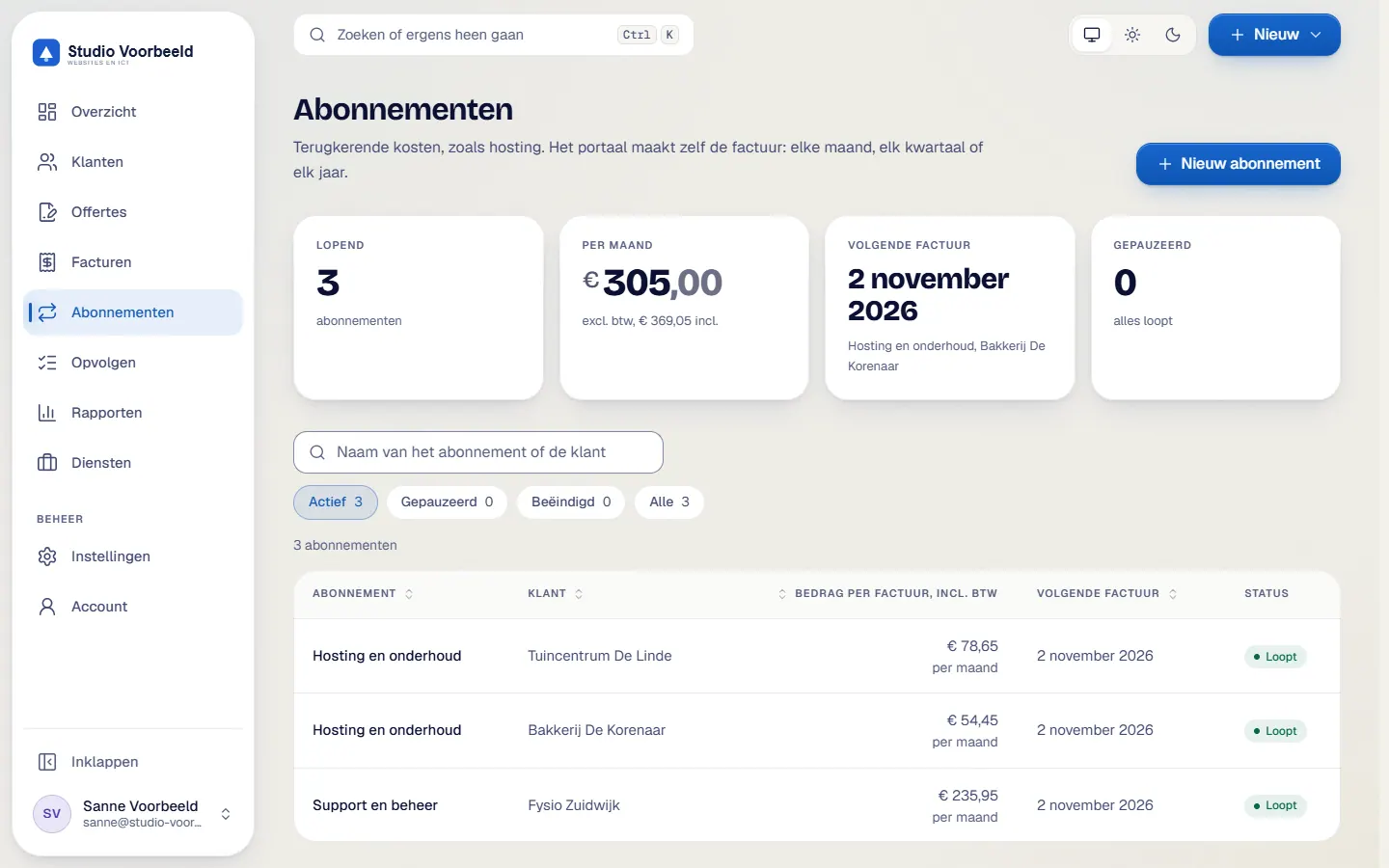
The overview shows the monthly amount and the next invoice date for each subscription, so you can see what recurring income arrives each month.
Plan a price rise ahead
You set a percentage with a start date. It applies to invoices from that date.
How it works, step by step
- Start a subscriptionBegin under Abonnementen without a quote, or from an accepted quote. The monthly lines, discount, VAT and file number then carry over.
- Fill in the linesEnter prices excluding or including VAT, choose the VAT rate or treatment and the language of the invoice, Dutch or English.
- Choose the repeatMonthly, quarterly or yearly, on a fixed day of the month (1 to 28), with a start date and optionally an end date. The invoice title includes the period, for example 'Hosting oktober 2026'.
- Choose to check or to automateBy default you check and send yourself. If you pick automatic, the invoice becomes final and goes to the client, and to Exact and OneDrive if those are switched on.
- The portal prepares the invoiceA daily task creates the draft invoice on the invoice date and you get a notification. An automatic invoice only goes out if the planned date is no more than 3 days ago.
- Manage the subscriptionYou can pause, resume and end it. When resuming you choose whether skipped periods are caught up.
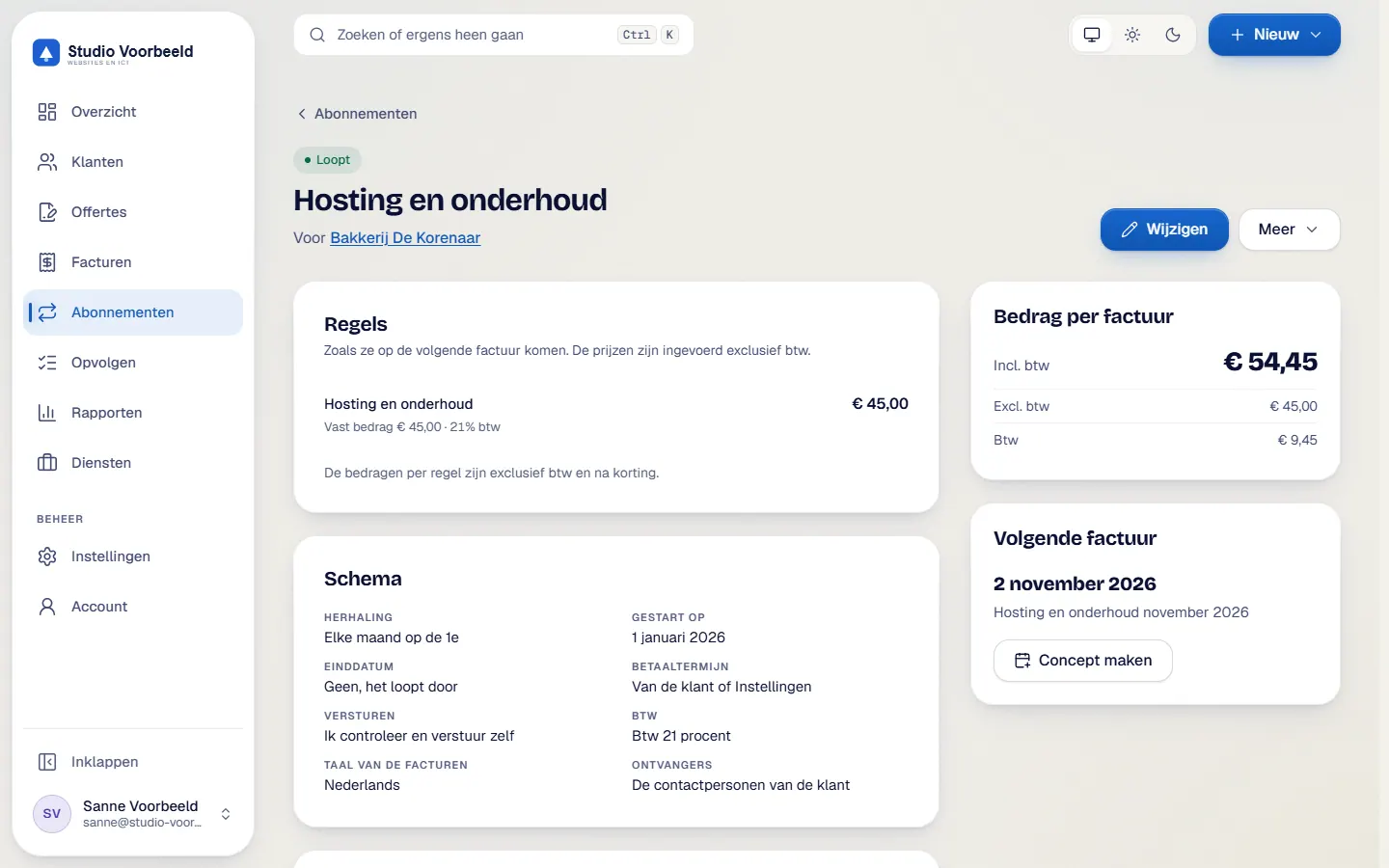
The screenshots show Avsaro with sample data from the invented company Studio Voorbeeld. The portal interface is in Dutch; documents, client pages and emails come in Dutch and English.
Automatic sending, with a brake on it
Automatic sending only works with the Microsoft 365 mail connection. You get a notification for each new draft and each automatic send. If the planned date is more than 3 days in the past (adjustable), the invoice does not go out by itself and you have to look at it.
How you stay in control
You plan a price rise yourself, with a percentage and a start date, so you decide when and by how much. The client pays a Recurring invoiceAn invoice that is created again on a fixed schedule, for example every month, quarter or year.
Read more like any other invoice, by iDEAL if Mollie is connected. Subscriptions are for business clients.
Frequently asked questions
Does the first invoice go out automatically?
No. You always check the first invoice of a subscription yourself.
Can I pause a subscription for a while?
Yes, you can pause and resume later. When resuming you choose whether skipped periods are caught up.
How do I apply a price rise?
You plan a price rise with a percentage and a start date. That way you decide when and by how much.
How does the client pay a subscription invoice?
Like any other invoice: by iDEAL if Mollie is connected, otherwise by bank transfer.
Related features
Terms
Read more about this

Next step
See a subscription in action
In a demo you see a subscription with sample data, including the invoices it has created.
No account or sign-up needed: enter your name and email and you are in your own demo straight away. After 30 minutes everything is wiped.
Get in touch