
Show the portal and keep your data private
With one action the portal replaces all personal data with made-up data and scales the amounts. You can click around freely in a meeting or at a fair. Saving and sending are blocked.
Enter your name and email and you are in your own demo straight away. After 30 minutes everything is wiped.
Who it is for
- You show the portal to a colleague, a client or a prospect and do not want to expose your own client data.
- You give a training session or take screenshots.
- You want to be sure nothing is sent by accident during a demonstration.
What it saves you
Your clients stay out of sight
Names, email addresses, phone numbers, addresses, chamber of commerce and VAT numbers, IBANs and free text are replaced.
The sums still add up
Amounts are scaled by one fixed factor per presentation, between 0.6 and 1.6, so totals stay consistent.
Nothing goes out by accident
Every write action is refused: saving, sending, payments and settings. Pdfs and exports return no file.
New data each time
Each time you switch it on, it uses its own made-up set, so two presentations cannot be linked.
How it works, step by step
- Switch the mode onUse the profile button, Account, Ctrl+K or Alt+Shift+P.
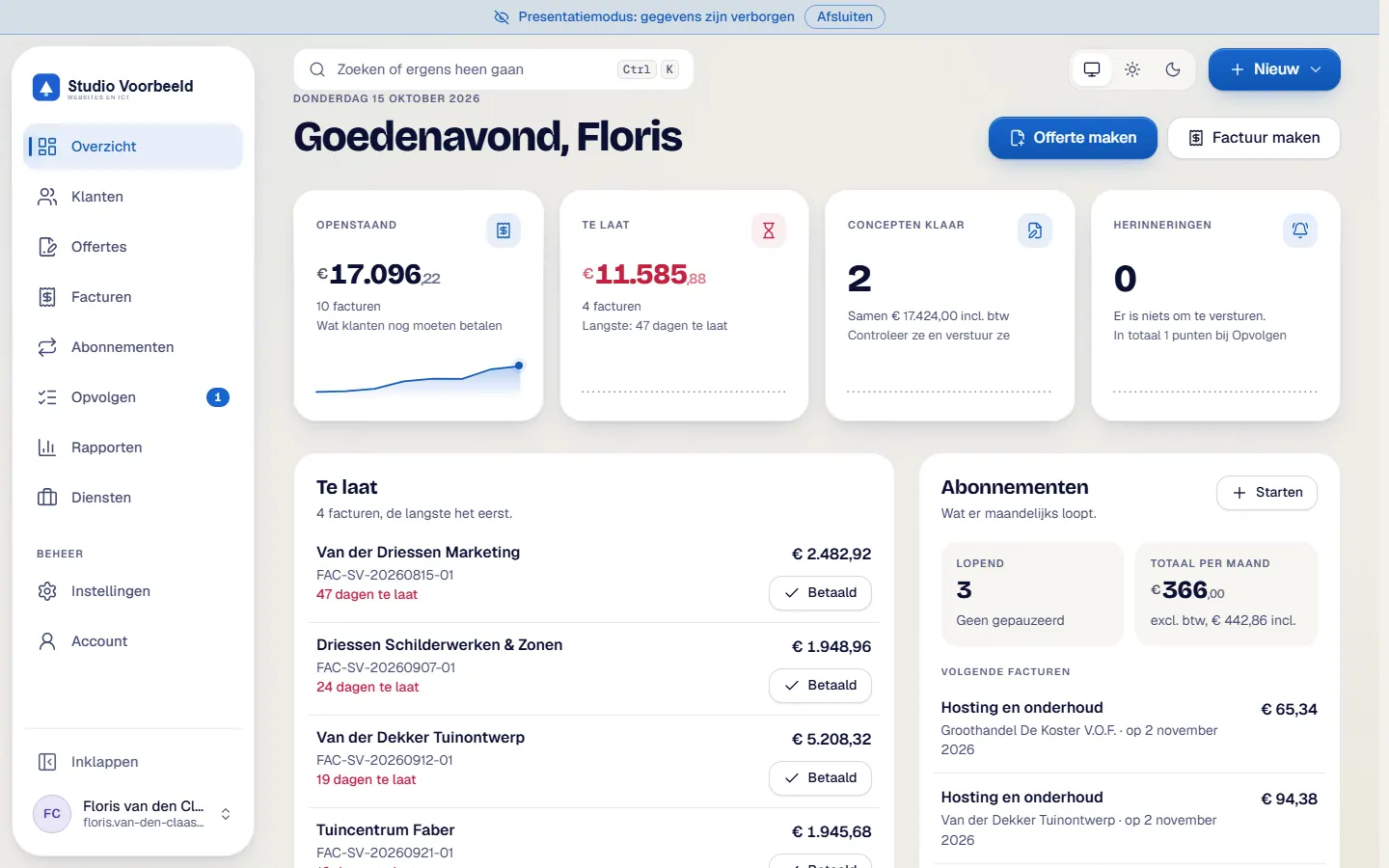
- Look for the barA fixed bar at the top reads 'Presentatiemodus: gegevens zijn verborgen'. It tells you for certain that you are in the safe view.
- Click through the portalYou can open all screens: overview, quotes, invoices, subscriptions and reports.
- Show what the portal can doAn attempt to save or send gives 'Niet beschikbaar in de presentatiemodus'. You can demonstrate freely.
- Switch the mode offAfterwards you see your own data again.
The screenshots show Avsaro with sample data from the invented company Studio Voorbeeld. The portal interface is in Dutch; documents, client pages and emails come in Dutch and English.
How the masking works
The masking happens at database level, not only on screen. A test enforces it for every text column in the data model, and a browser test has covered 112 pages. The state is kept in a session cookie.
What to watch for
- dates and document numbers stay real
- a rounding can be off by a cent
- searching for a real name finds the row, but only shows made-up values
- background tasks such as email and reminders keep running
- if you open a client link yourself while the mode is on, you see made-up data
The mode hides what an onlooker sees on screen. Your clients and figures stay out of view.
Frequently asked questions
Are the amounts still real?
No. They are scaled by a fixed factor. Totals are consistent with each other, but a rounding difference of a cent is possible.
Are the dates made up?
No. Dates and document numbers stay real.
Can I send a quote while the mode is on?
No. All write actions are refused.
Does the mode stop the reminders?
No. Background tasks keep running.
Related features
Terms
Read more about this

Next step
See it in a demo
In a demo you switch on presentation mode and see how Avsaro looks with made-up data.
Enter your name and email and you are in your own demo straight away. After 30 minutes everything is wiped.
Get in touch